What’s new in BiblioRata
Built for the pulpit, the projection desk, and every phone in the pews.
November 2026
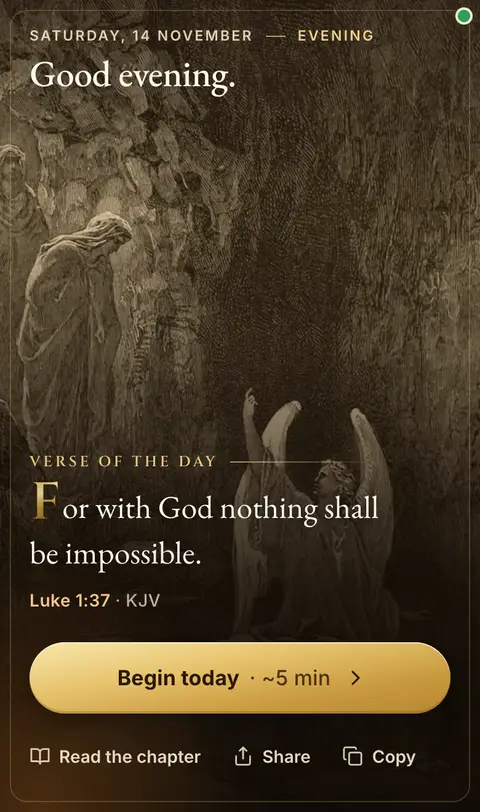
✦ Begin today — five quiet minutes
Home now opens like an illuminated Bible: the verse of the day over a classic painting, with a greeting for the time of day. Press Begin today for six short steps — the verse (tap Listen to hear it), the passage, a reflection, a word of the faith, a prayer and Amen. Finish and the ring keeps your daily streak.

❖ The Glossary of the Faith
Grace, faith, redemption, righteousness — the big words of the faith in plain English, with the Greek or Hebrew word behind each one, a line for new believers and the key verses to read. Find them at /faith, or swipe through them on Home. Every word is reviewed by the pastor before it is shown.
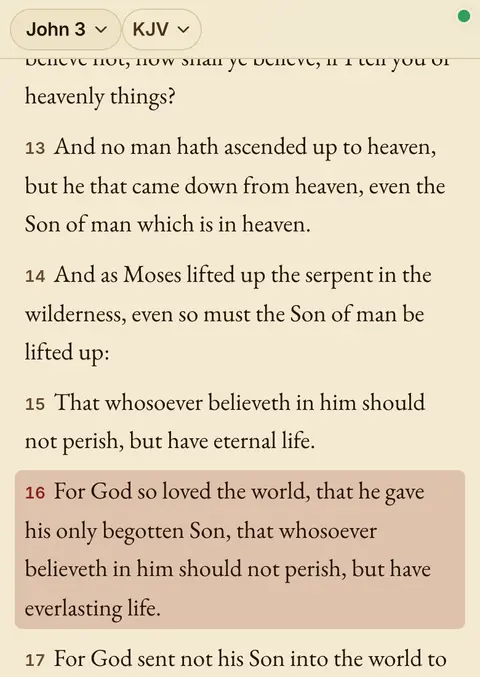
§ A Bible reader like the book
One verse per line in large, clear type, the chapter tools on the chapter line and the next chapter at the end. Search now has its own tab: verses holding all your words come first, highlighted, and a tap opens the whole chapter at your verse.
☰ Five tabs in the app
The BiblioRata app (version 1.0.5) has a tab bar: Home · Bible · Search · Plans · More. Your reading plans are one tap away, and the Bible tab opens where you left off.
♻ Works offline from the first launch
The first time you open the app, the King James Bible downloads by itself and the main pages are saved. With no data you can still read, search, plan and do Today — your changes sync when you are back. A small dot in the corner shows it: green online, red offline.
✠ Pastor mode — This Sunday
For pastors, Home now leads with This Sunday: your next service, its order, what still needs doing, and one tap to open it, present it, or get it ready to preach with no Wi-Fi. Turn Pastor mode on or off in More.
❧ From fellow readers
Short notes from people who read with BiblioRata now appear on Home and on the welcome page. Has it helped you? Tap Share how BiblioRata helps you and add yours.
✦ Sliders that break like glass
The glossary and the readers’ notes now move as sliders. Every few seconds the card cracks and falls away in pieces to show the next one. Swipe any time; if your phone is set to reduce motion, they simply slide.
Earlier
✦ A calmer, modern reader
BiblioRata now reads like a Bible app: one passage in a clean column, the book and chapter one tap away, light / sepia / dark themes, and swipe for the next chapter on your phone. Tap a verse to highlight, note, copy, share or compare it. Compare, preach, the queue, Go Live and the phone remote are all still here — under Compare, Preach and More.
✦ Beautiful Looks for the big screen
Thirteen slide templates — Royal Blue, Emerald, Crimson Velvet, Stained Glass, Night Sky, Dawn and more — for Scripture, songs and thoughts, with the words sized to fill the screen and gentle crossfades. Use your own picture or a looping video behind the words. Live buttons like EasyWorship: Black, Clear, Logo, a countdown to the service and alerts across the bottom — all working offline.
♫ An Audio Bible that keeps reading
Press ► on any pane and the chapter is read to you in a warm narrated voice — and it keeps playing when you lock your phone or switch apps, with play, pause and skip on your lock screen. Each chapter flows into the next, straight through the canon.
✦ A grander front door
The Scriptorium welcome is now an illuminated page — type one reference and you’re reading side by side in seconds, the verse of the day sits in a gold-framed plate, and your recent studies wait on a shelf of codices.
♫ The Preach Queue
Line up the whole service before it starts — scriptures, songs, and thoughts, in order. During the sermon, one click puts each item on the big screen.
♬ Songs & thoughts, projected
Type lyrics or a note, leave a blank line between stanzas, and each stanza becomes its own beautiful slide — on the projector and on every phone following live.
✶ Ask anything, mid-sermon
The preacher mentions the crusaders, Azusa Street, the walls of Jericho… type it in the Go box and the study assistant answers with a projectable card plus the Scriptures that go with it.
☎ Your phone is the clicker
Scan a secret QR and walk anywhere in the room — next, previous, even chasing a called reference, straight from your pocket.
⌗ The stage display
A confidence monitor for the pulpit: the current verse small, the next verse big, and a clock — the preacher always knows what’s coming.
✦ Dress the projection
Vellum, deep ink, or clean paper — pick the projector’s look and text size from the console. It remembers your choice for next Sunday.
⤾ One press back
The preacher detours to an aid, then says “back to our text” — press Back (or B) and you’re on the exact verse you left, instantly. It’s on the phone remote too.
◆ Pictures on the screen
Drop announcement slides and sermon graphics straight into the queue — one click projects them full-screen, and the congregation’s phones see them too.
☉ Go Live — now with a takeaway
The congregation follows on their phones, verse by verse. And when the service ends, every phone receives tonight’s scriptures — the full list, ready to keep reading at home.
▢ Blank the screen in a tap
Before the service and between segments, snap the projector to a calm holding screen — one press of Blank (or the . key). Cue the next verse underneath; tap again and it’s right there.
♫ Songs you don’t retype
Pick a hymn from the built-in public-domain hymnal, or reuse any song you’ve queued before — one tap fills the lyrics in. Build the music half of the service in seconds.
♻ It survives a hiccup
If a phone drops Wi-Fi mid-service, it snaps right back to the live verse the moment it reconnects — no stale screen. And if the projection window gets closed or refreshed, reopening it restores exactly what was up: passage, theme, even a blanked screen.
§ The passage, named on screen
The congregation no longer sees a lonely “16” — the full reference rides across the top of every projected verse, like John 3:16 · KJV, and follows along as you move, so anyone glancing up knows exactly where you are.
…the fruit of the Spirit is love, joy, peace, longsuffering…
✶ Make the key word glow
When the minister leans on a word — peace, grace, abide — tap it on the verse and it lights up on the projector and on every following phone. Tap again to let it go.
⚓ One key back to your text
Anchor your main teaching passage, wander off to as many cross-references as the sermon takes — then press H (or ⌂) and you’re back on the exact verse you paused at. No more hunting.
♫ Queue a stack in one go
For a fast-moving minister, type several references separated by commas (John 3:16, Rom 8:28, Ps 23) and they drop into the queue as separate items in a single tap — no more adding them one at a time.
◫ Split the screen, two passages at once
Put up to four different scriptures side-by-side on the projector — a promise beside its fulfilment, the Law beside the Gospel. Click a side (or press 1–4) to make it active, then Next or Go moves just that passage while the others hold steady.
⧉ Send the join code to the whole room
When you go live, one tap — Show on screen — throws the QR and the join code up on the projector itself. The whole assembly can scan it from their seats and follow along on their phones; no one has to crowd the laptop. Tap again to take it back down.
✦ The Rabbi paints the passage
Highlight a passage, ask the Rabbi, and tap Illustrate this passage — and a real picture of the scene appears, rendered like an illuminated manuscript: warm vellum, sepia ink, gold leaf. The ark, the burning bush, Jericho’s walls, David in the valley — reverent, and safe to project. The Rabbi now weighs the whole highlighted span too, not just its first verse. (A few illustrations a day, to keep costs gentle.)